Saturday, April 2, 2016

Local Langugae in Oracle using NLS_LANG

There might be cases where you may need to extract the data stored in the database in the local language along with the English for some reporting purpose Here is the way how it can be achieved. Pre-requisite is that data must be stored in the Data Base in the local language character set.
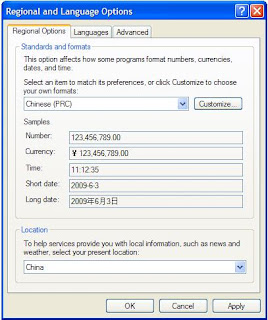
1) Change the language setting from the control panel.
Regional and Language Options -->
Regional Options
 form the lov {customize} (in this case I have chosen “Chinese”)


Advanced In the lov select
System will restart...
and the new language setting will be activated.


2) Change the variable NLS_LANG in registry... for the sql*plus where you want to run the query.
Get the vale from the database using the following query..
SELECT nls_language || '.' || nls_codeset AS nls_lang
  FROM fnd_languages
 WHERE nls_territory LIKE '%CHIN%';


Run ----> regedit--> 
HKEY_LOCAL_MACHINE --->
SOFTWARE -->
oracle -->


search for NLS_LANG Variable in the registry for the oracle home where you want to run the query.
To know more about the NLS_LANG click
NLS_LANG is a client side environmental variable. To specify the locale behavior- setting the NLS_LANG environment parameter is the simplest way.

With the setting of NLS_LANG parameter on client machine it is specified the language, territory and character set used by the client application. As through NLS_LANG parameter, client character set is also specified so oracle has an idea which is the character set for data entered or displayed by a client program as well as Oracle can do (if needed) conversion from the client's character set to the database character set.

After changing the settings re-launch the sql*plus session and start getting the output in whatever local language it may be..

Note: Dont forget to chnage back to the original values once you have completed your activity.

~~~ Cheers

Dependencies for Given Object

Friends some times while trouble shooting or for some analysis we may need the dependency hierarchy of the object, For that we have oracle provided view public_dependency. From where we can extract the details.
SQL> SELECT object_type, owner, object_name
2 FROM dba_objects
3 WHERE object_name = 'PUBLIC_DEPENDENCY';

OBJECT_TYPE OWNER OBJECT_NAME
--------------- --------------- ------------------------------
VIEW SYS PUBLIC_DEPENDENCY
SYNONYM PUBLIC PUBLIC_DEPENDENCY

SQL> desc PUBLIC_DEPENDENCY
Name Null? Type
------------------------------- -------- ----
OBJECT_ID NOT NULL NUMBER
REFERENCED_OBJECT_ID NOT NULL NUMBER
The following query can be used to identify the objects that a given object is dependent upon:
SELECT lvl, u.object_id, u.object_type, LPAD (' ', lvl) || object_name obj
FROM (SELECT LEVEL lvl, object_id
FROM SYS.public_dependency s
START WITH s.object_id =
(SELECT object_id
FROM user_objects
WHERE object_name = UPPER ('&OBJECT_NAME')
AND object_type = UPPER ('&OBJECT_TYPE'))
CONNECT BY s.object_id = PRIOR referenced_object_id
GROUP BY LEVEL, object_id) tree,
user_objects u
WHERE tree.object_id = u.object_id
ORDER BY lvl
/
When prompted, enter the OBJECT_NAME of the OBJECT_TYPE whose dependencies you want to identify.
SQL> SELECT lvl, u.object_id, u.object_type, LPAD (' ', lvl) || object_name obj
2 FROM (SELECT LEVEL lvl, object_id
3 FROM SYS.public_dependency s
4 START WITH s.object_id =
5 (SELECT object_id
6 FROM user_objects
7 WHERE object_name = UPPER ('&OBJECT_NAME')
8 AND object_type = UPPER ('&OBJECT_TYPE'))
9 CONNECT BY s.object_id = PRIOR referenced_object_id
10 GROUP BY LEVEL, object_id) tree,
11 user_objects u
12 WHERE tree.object_id = u.object_id
13 ORDER BY lvl
14 /
Enter value for object_name: XXXX_OJECTS_V
old 7: WHERE object_name = UPPER ('&OBJECT_NAME')
new 7: WHERE object_name = UPPER ('XXXX_OBJECTS_V')
Enter value for object_type: VIEW
old 8: AND object_type = UPPER ('&OBJECT_TYPE'))
new 8: AND object_type = UPPER ('VIEW'))

LVL OBJECT_ID OBJECT_TYPE OBJ
---------- ---------- --------------- ------------------------------
1 2655531 VIEW XXXX_OBJECTS_V
2 2655459 SYNONYM XXXX_OBJECTS
2 2655461 SYNONYM XXXX_OBJECTS_LOG
Another way In the $OH/rdbms/admin exists a UTLDTREE.SQL script which creates a procedure called deptree_fill. This procedure and some tables created with the script make it possible for a user, to see the dependency for objects. Run this script once for each schema that needs this utility. The UTLDTREE.SQL creates a view deptree which will ultimately contain the dependent information for the object. This view is also created as SYS.DEPTREE, the view shows which shared cursors depend on the given object. If the current user is not sys, then this view may get an error, either about lack of privileges or about the non-existence of table x$kglxs. Example -------
SQL> @$ORACLE_HOME/rdbms/admin/utldtree.sql

SQL> SELECT object_type, owner, object_name, status
2 FROM dba_objects
3 WHERE object_name = '&obj_name'
4 /
Enter value for obj_name: XXXX_OBJECTS_V
old 3: WHERE object_name = '&obj_name'
new 3: WHERE object_name = 'XXXX_OBJECTS_V'

OBJECT_TYPE OWNER OBJECT_NAME STATUS
--------------- --------------- ------------------------------ -------
VIEW APPS XXXX_OBJECTS_V VALID
SYNONYM GGL_READONLY XXXX_OBJECTS_V VALID
SYNONYM XXGGLOM XXXX_OBJECTS_V VALID

SQL> EXEC deptree_fill('VIEW','APPS','XXXX_OBJECTS_V');

PL/SQL procedure successfully completed.

SQL> select * from deptree order by seq#;

NESTED_LEVEL TYPE SCHEMA NAME SEQ#
------------ -------- -------- ------------------------------ ----------
0 VIEW APPS XXXX_OBJECTS_V 0
1 SYNONYM XXOM XXXX_OBJECTS_V 1
1 PACKAGE APPS XXGGL_OM_EMAIL_BATCH 2
BODY
1 SYNONYM XXREAD XXXX_OBJECTS_V 3
ONLY
This shows the dependency relationship via indenting.
SQL> select * from ideptree;

DEPENDENCIES
--------------------------------------------------------------------------------
SYNONYM XXOM.XXXX_OBJECTS_V
PACKAGE BODY APPS.XXGGL_OM_EMAIL_BATCH
VIEW APPS.XXXX_OBJECTS_V
SYNONYM XXREADONLY.XXXX_OBJECTS_V
define OWNER='SCOTT';
define PARENT_TABLE ='TEST_1' ;

select level,lpad('> ',5*(level-1)) || to_char(child) "TABLE" from 
(select b.table_name "PARENT",a.table_name "CHILD" 
from all_constraints a,all_constraints b 
where a.owner=b.owner 
and a.owner='&OWNER' 
and a.constraint_type='R' 
and a.r_constraint_name=b.constraint_name 
order by b.table_name,a.table_name) 
start with parent='&PARENT_TABLE' 
connect by prior child = parent ;
~~cheers...

Windows ---- Usefull RUN commands!!!

Hi Dbas,

Some times when we are working with windows variants these commands will be very handy..

Accessibility Controls - access.cpl
Add Hardware Wizard - hdwwiz.cpl
Add/Remove Programs - appwiz.cpl
Administrative Tools - control admintools
Automatic Updates - wuaucpl.cpl
Bluetooth Transfer Wizard - fsquirt
Calculator - calc
Certificate Manager - certmgr.msc
Character Map - charmap
Check Disk Utility - chkdsk
Clipboard Viewer - clipbrd
Command Prompt - cmd
Component Services - dcomcnfg
Computer Management - compmgmt.msc
Date and Time Properties - timedate.cpl
DDE Shares - ddeshare
Device Manager - devmgmt.msc
Direct X Control Panel (If Installed)* - directx.cpl
Direct X Troubleshooter - dxdiag
Disk Cleanup Utility - cleanmgr
Disk Defragment - dfrg.msc
Disk Management - diskmgmt.msc
Disk Partition Manager - diskpart
Display Properties - control desktop
Display Properties - desk.cpl
Display Properties (w/Appearance Tab Preselected) - control color
Dr. Watson System Troubleshooting Utility - drwtsn32
Driver Verifier Utility - verifier
Event Viewer - eventvwr.msc
File Signature Verification Tool - sigverif
Findfast - findfast.cpl
Folders Properties - control folders
Fonts - control fonts
Fonts Folder - fonts
Free Cell Card Game - freecell
Game Controllers - joy.cpl
Group Policy Editor (XP Prof) - gpedit.msc
Hearts Card Game - mshearts
Iexpress Wizard - iexpress
Indexing Service - ciadv.msc
Internet Properties - inetcpl.cpl
IP Configuration (Display Connection Configuration) - ipconfig /all
IP Configuration (Display DNS Cache Contents) - ipconfig /displaydns
IP Configuration (Delete DNS Cache Contents) - ipconfig /flushdns
IP Configuration (Release All Connections) - ipconfig /release
IP Configuration (Renew All Connections) - ipconfig /renew
IP Configuration (Refreshes DHCP & Re - Registers DNS) - ipconfig /registerdns
IP Configuration (Display DHCP Class ID) - ipconfig /showclassid
IP Configuration (Modifies DHCP Class ID) - ipconfig /setclassid
Java Control Panel (If Installed) - jpicpl32.cpl
Java Control Panel (If Installed) - javaws
Keyboard Properties - control keyboard
Local Security Settings - secpol.msc
Local Users and Groups - lusrmgr.msc
Logs You Out Of Windows - logoff
Microsoft Chat - winchat
Minesweeper Game - winmine
Mouse Properties - control mouse
Mouse Properties - main.cpl
Network Connections - control netconnections
Network Connections - ncpa.cpl
Network Setup Wizard - netsetup.cpl
Notepad - notepad
Nview Desktop Manager (If Installed) - nvtuicpl.cpl
Object Packager - packager
ODBC Data Source Administrator - odbccp32.cpl
On Screen Keyboard - osk
Opens AC3 Filter (If Installed) - ac3filter.cpl
Password Properties - password.cpl
Performance Monitor - perfmon.msc
Performance Monitor - perfmon
Phone and Modem Options - telephon.cpl
Power Configuration - powercfg.cpl
Printers and Faxes - control printers
Printers Folder - printers
Private Character Editor - eudcedit
Quicktime (If Installed) - QuickTime.cpl
Regional Settings - intl.cpl
Registry Editor - regedit
Registry Editor - regedit32
Remote Desktop - mstsc
Removable Storage - ntmsmgr.msc
Removable Storage Operator Requests - ntmsoprq.msc
Resultant Set of Policy (XP Prof) - rsop.msc
Scanners and Cameras - sticpl.cpl
Scheduled Tasks - control schedtasks
Security Center - wscui.cpl
Services - services.msc
Shared Folders - fsmgmt.msc
Shuts Down Windows - shutdown
Sounds and Audio - mmsys.cpl
Spider Solitare Card Game - spider
SQL Client Configuration - cliconfg
System Configuration Editor - sysedit
System Configuration Utility - msconfig
System File Checker Utility (Scan Immediately) - sfc /scannow
System File Checker Utility (Scan Once At Next Boot) - sfc /scanonce
System File Checker Utility (Scan On Every Boot) - sfc /scanboot
System File Checker Utility (Return to Default Setting) - sfc /revert
System File Checker Utility (Purge File Cache) - sfc /purgecache
System File Checker Utility (Set Cache Size to size x) - sfc /cachesize=x
System Properties - sysdm.cpl
Task Manager - taskmgr
Telnet Client - telnet
User Account Management - nusrmgr.cpl
Utility Manager - utilman
Windows Firewall - firewall.cpl
Windows Magnifier - magnify
Windows Management Infrastructure - wmimgmt.msc
Windows System Security Tool - syskey
Windows Update Launches - wupdmgr
Windows XP Tour Wizard - tourstart
Wordpad - write

~~Cheers

FNDCPASS Usage..Tricks and Methods

In Oracle Application 11i and R12, we have an FND functionality for changing the passwords for either application user, or product schema password or most important the “APPS” password. The FND binary which will help us is doing these things is FNDCPASS.
This is present in $FND_TOP/bin directory.
This post explains the usage of FNDCPASS, best practices that needs to be followed while using FNDCPASS and some tricks when FNDCPASS screws up the instance :))

Using FNDCPASS
Below is the usage for FNDCPASS
$FNDCPASS
Usage: FNDCPASS logon 0 Y system/password mode username new_password

where logon is username/password[@connect]

system/password is password of the system account of that database

mode is SYSTEM/USER/ORACLE

username is the username where you want to change its password

new_password is the new password in unencrypted format

Example:
FNDCPASS apps/apps 0 Y system/manager SYSTEM APPLSYS WELCOME

FNDCPASS apps/apps 0 Y system/manager ORACLE GL GL1

FNDCPASS apps/apps 0 Y system/manager USER VISION WELCOME
You can just type FNDCPASS and press enter, it will give you these details.

The first usage
FNDCPASS apps/apps 0 Y system/manager SYSTEM APPLSYS WELCOME
is for changing the password for apps and applsys. These are the database schema users
(most important for application to work). Password for both these users should be in synch. You can change the password of these users using this command. Note that this is the only way to change the password for apps and applsys. Please do not try any other method for changing apps and applsys password. Oracle recomends using FNDCPASS only to change apps and applsys password. Also note that using this command will change the password for both apps and applsys.

Following activities will take place

(1) applsys validation. (make sure APPLSYS name is correct)
(2) reencrypt all password in FND_USER
(3) reencrypt all password in FND_ORACLE_USERID
(4) update applsys’s password in FND_ORACLE_USERID table.
(5) Update apps password in FND_ORACLE_USERID table. Also changes are made in DBA_USERS table.

The second usage
FNDCPASS apps/apps 0 Y system/manager ORACLE GL GL1
is for changing password for any other product schema like MSC, GL etc.

Following activities will take place
(1) update GL’s password in FND_ORACLE_USERID table. The new password is reencrypted
with the current applsys password. If GL does not exists, step (2) below does not happen. Message for invalid oracle user is written in the log file.

(2) alter user to change GL’s password.

The third usage
FNDCPASS apps/apps 0 Y system/manager USER VISION WELCOME
is for changing the application level passwords like sysadmin etc used for logging into
application.

Following activities will take place
(1) update VISION’s password in FND_USER table. The new password is reencrypted
with the current applsys password.

If VISION does not exist, message for invalid application user is written in the log file.
No products affected by the patch When you run FNDCPASS command it will check the integrity of all schema password in the application. If any of the password is corrupt then this will through and error and will not change the password.

The tables that it uses is FND_USER and FND_ORACLE_USERID. All the application
passwords and schema passwords are stored in these two tables. Ofcourse DBA_USERS
will have the schema users and password stored as well.

When we run FNDCPASS it will update all the above 3 tables.

Best practices for using FNDCPASS
Before using FNDCPASS and changing the passwords from default to some thing else,
always follow the following best practices.
1) Always, Always, Always keep the back of tables FND_USER and FND_ORACLE_USERID. You can take back of these tables using CREATE TABLE —
AS SELECT * FROM —.

You must have backup of these tables before running FNDCPASS. In case if FNDCPASS fails then it might corrupt the passwords of your application and worst can happen that the application wont come up. So always be cautions about this command.

2) If possible also keep an export dump of these two tables.

3) Verify each arguement you are providing to FNDCPASS. Like verify that apps and system passwords you are providing is correct.

4) Never update apps, applsys or any schema password directly from database using the alter command. Always use FNDCPASS. System password can be set directly using ALTER command in database.

Issue with APPLSYS and APPS password

Scenario 1:
As you know that apps and applsys password should be in synch and should be changed
using FNDCPASS.
There can be situation where a novice user changes applsys password from the backend
database. In that case when you try to start the services it will show following error
APPFND01496:

Cannot access application ORACLE password

Cause: Application Object Library was unable access your ORACLE password.
You can even reproduce this issue (ofcourse after taking the backup of FND_USER and
FND_ORACLE_USERID table) using the following steps:

1. Use the ALTER USER command to change the APPLSYS password
2. Try to run the adstrall.sh script to start Apps services.
3. You will get an error “Cannot complete applications logon. You may have entered an invalid applications password, or there may have been a database connect error.”
4. Then try FNDCPASS to fix password and you will get the error the APPFND01496
error.

If this situation happens then you cannot access the application. In fact the services even wont start.
Resolution to such problem is to rollback the 2 tables FND_USER and FND_ORACLE_USERID. Once you rollback the tables, apps and applsys passwords will be in synch and password will be older one. You can then run FNDCPASS and change the password.

Scenario 2:
Some times when you run FNDCPASS, you get following error
APPFND01502: Cannot encrypt application ORACLE password

Cause: Application Object Library was unable encrypt your ORACLE password.

Action: Contact your support representative. (ORACLEUSER=APPS_SERV)
The error comes because the table fnd_oracle_userid contain rows for schemas that does
not exist. Those rows must be deleted from the table.

Use the following query to get the details of the schema that doest not exists
select * from fnd_oracle_userid
where oracle_username not in
(select username from all_users);
The rows returned by this query can be deleted from FND_ORACLE_USERID table.
This will resolve this issue.

Scenario 3:
There can be situation where users has update APPLSYS password using ALTER command in database directly and also you dont have backup of those tables. Under such situation, it is very difficult to recover the application and make it working. Still following methodology is proposed which might help you to restore the password back and make your application work fine.

For this to work you should have some other application (may be debug or UAT) which is having the same passwords or default passwords for schemas. If you have such application the following the below steps in the application which is affected by password mismatch.

This method is for resetting apps and applsys passwords. Below are the SQL statements that will help you reset the APPS and APPLSYS passwords to APPS, the APPLSYSPUB password to PUB, and the SYSADMIN password to SYSADMIN.

WARNING: This procedure will cause all user passwords to become invalid. ALL users
passwords will need to be reset through the sysadmin responsibility.

Step 1) Reset the Oracle User IDs
Open a SQL*Plus as SYSTEM and reset the passwords for the APPS, APPLSYS, and the
APPLSYSPUB Oracle user ID:
ALTER USER apps IDENTIFIED BY apps;
ALTER USER applsys IDENTIFIED BY apps;
ALTER USER applsyspub IDENTIFIED BY pub;
Step 2) Backup the FND_ORACLE_USERID and FND_USER tables (even though these tables are right now corrupted, do take a backup. You can restore the same when ever you want).

Open a SQL*Plus session as APPLSYS and backup the tables:
create table FND_ORACLE_USERID_BAK as (select * from FND_ORACLE_USERID);
create table FND_USER_BAK as (select * from FND_USER);

Step 3) Reset the APPS and APPLSYS application encrypted passwords
Open a SQL*Plus session as APPLSYS and update the FND_ORACLE_USERID table.
update FND_ORACLE_USERID
set ENCRYPTED_ORACLE_PASSWORD =
‘ZGA34EA20B5C4C9726CC95AA9D49EA4DBA8EDB705CB7673E645EED570D54
47161491D78D444554655B87486EF537ED9843C8'
where ORACLE_USERNAME in (’APPS’, ‘APPLSYS’);
commit;
This encrypted string we are updating is the default encrypted string for apps. So if your
application is having apps password the encrypted string will look like this. We are
updating this encrypted string here directly.

Verify the table update:
select ENCRYPTED_ORACLE_PASSWORD from FND_ORACLE_USERID
where ORACLE_USERNAME IN (’APPS’, ‘APPLSYS’);
Step 4) Reset the APPLSYSPUB application encrypted password
Open a SQL*Plus session as APPLSYS and update the FND_ORACLE_USERID table.
update FND_ORACLE_USERID
set ENCRYPTED_ORACLE_PASSWORD =
‘ZG31EC3DD2BD7FB8AD2628CE87DDDF148C1D2F248BE88BE987FDF8283022
8A88EF44BC78BC7A9FAD4BFB8F09DAD49DF7280E’
where ORACLE_USERNAME = (’APPLSYSPUB’);
commit;
The above encrypted string is the encrypted string for password pub. If your applsyspub
password is pub then the encrypted string in FND_ORACLE_USERID will look like
this.
Verify the table update:
select ENCRYPTED_ORACLE_PASSWORD
from FND_ORACLE_USERID
where ORACLE_USERNAME = ‘APPLSYSPUB’;
Once these updates are done, try your luck by running FNDCPASS and it should work fine.
~~ Cheers